# Authentication and Authorization Guide

Welcome to the **Wallapop Connect API** authentication guide! Here, you’ll learn how to securely integrate your application using the **OAuth 2.0 Authorization Code Flow with PKCE**—a modern, secure way to handle authentication. This method ensures your app communicates safely with Wallapop's resource server while following industry best practices from the [OAuth 2.0 Security Best Current Practice RFC](https://datatracker.ietf.org/doc/html/draft-ietf-oauth-security-topics#section-2.1.1).

To make life easier, we **highly recommend** using an OAuth 2.0 client library to handle the heavy lifting for you.

## How OAuth 2.0 Authorization Code Flow with PKCE Works

Here’s a high-level overview of what happens when a user logs in:

```mermaid
sequenceDiagram
    participant User
    participant app as Your Application
    participant auth as Wallapop Auth Server
    participant server as Wallapop Server

    User->>app: Click login
    note over app: Generate Code Verifier and Code Challenge
    app->>auth: Request authorization code with Code Challenge
    auth->>User: Redirect to login/authorization prompt
    User->>auth: Authenticate and consent
    auth->>app: Return authorization code
    app->>auth: Exchange authorization code and Code Verifier for tokens
    auth->>app: Issue access and refresh tokens
    app->>server: Use access token to request resources
    server->>app: Return requested resources
```

## Setting Up Your OAuth Integration

### 🔗 Redirect URI

The `redirect_uri` tells Wallapop where to send the user after login. It should be an endpoint in your app, like `/callback`, where your app will handle the authorization code.

### 🔑 Client ID and Secret

Wallapop provides a `client_id` (public) and a `client_secret` (private). You'll need these to authenticate your app.

### 🔐 PKCE Code Verifier & Code Challenge

To access Wallapop resources, you need an access token obtained by exchanging an authorization code.

Since we're using **PKCE (Proof Key for Code Exchange)**, the first step is for your app to generate a `code_verifier` and a `code_challenge`:

- `code verifier`: A randomly generated, URL-safe string with at least **43 characters**.
- `code_challenge`: A derived value from the code verifier, calculated as follows:
  1. Apply **SHA-256 hashing** to the code verifier.
  2. Encode the result using **Base64 URL encoding** (without padding).


The final transformation can be represented as:

```plaintext
BASE64URL-ENCODE(SHA256(ASCII(code_verifier)))
```

## 🚀 OAuth Authentication Process: Step by Step

Here's how your app gets access:

```mermaid
flowchart 
    A[User initiates login] --> B(Request Authorization Code)
    B --> C(User authenticates)
    C --> D(Authorization Code Received)
    D --> E(Exchange Authorization Code for Tokens)
    E --> F(Refresh Tokens)
```

### 1️⃣ User Logs In

The user clicks **Login** in your app.

### 2️⃣ Request an Authorization Code

Your app sends a request to the authorization server’s `/auth` endpoint with:

- `redirect_uri`
- `code_challenge`
- Other required parameters


OAuth scopes
Just request the `code`—no need to set extra OAuth scopes!

Example
```shell cURL
curl -i -X GET \
  'https://iam.wallapop.com/realms/wallapop-connect/protocol/openid-connect/auth?client_id=string&response_type=code&redirect_uri=http%3A%2F%2Fexample.com&code_challenge=string&code_challenge_method=S256'
```

Parameter Definitions
| Parameter | In | Required | Type | Description |
|  --- | --- | --- | --- | --- |
| `client_id` | query | true | string | The client application’s identifier. |
| `response_type` | query | true | string | Must be `code` for the Authorization Code Grant. |
| `redirect_uri` | query | true | string (uri) | The URL where the authorization server will send the user after authentication. |
| `code_challenge` | query | true | string | The transformation method for the code challenge (e.g., `S256`). |
| `state` | query | false | string | Optional opaque value to prevent cross-site request forgery. |


### 3️⃣ User Authentication

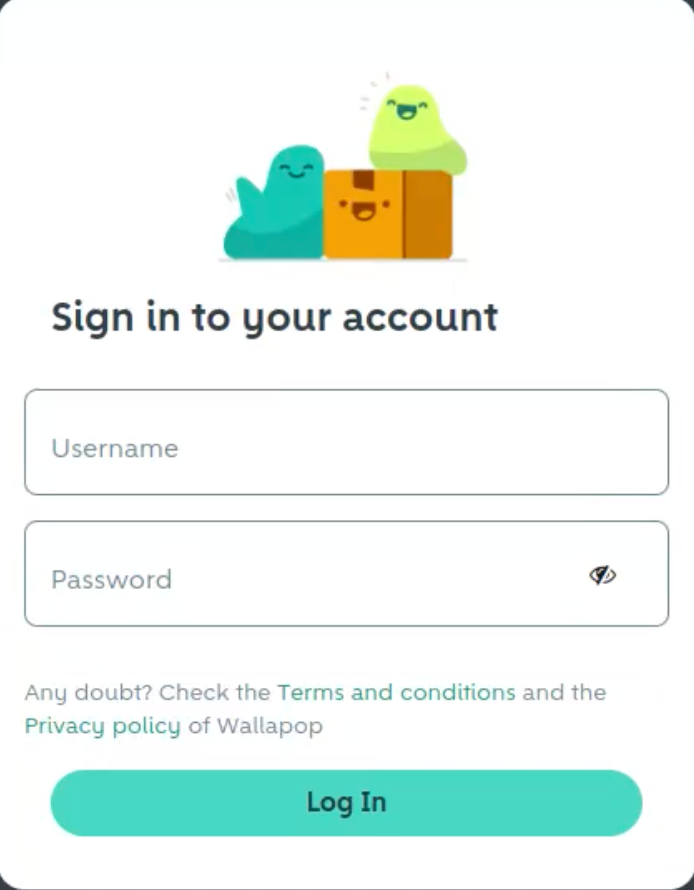
The professional user is redirected to **Wallapop’s login page**. Once authenticated, with their mail and password used on Wallapop, they are sent back to your app.
Description of image
### 4️⃣ Authorization Code Received

Your app receives an **authorization code** via the `redirect_uri`.

### 5️⃣ Exchange Authorization Code for Tokens

Your app sends a **POST** request to `/token` with:

- Authorization `code`
- `code_verifier`
- Other required parameters


Example
```shell cURL
curl -i -X POST \
  https://iam.wallapop.com/realms/wallapop-connect/protocol/openid-connect/token \
  -H 'Content-Type: application/x-www-form-urlencoded' \
  -H 'User-Agent: string' \
  -d grant_type=authorization_code \
  -d code=string \
  -d redirect_uri=http://example.com \
  -d code_verifier=string \
  -d client_id=string \
  -d client_secret=string
```

Request Body Schema
```json
{
  "$ref": "#/components/schemas/TokenRequestAuthCode",
  "components": {
    "schemas": {
      "TokenRequestAuthCode": {
        "type": "object",
        "required": [
          "grant_type",
          "code",
          "redirect_uri",
          "code_verifier",
          "client_id",
          "client_secret"
        ],
        "properties": {
          "grant_type": {
            "type": "string",
            "description": "The type of authorization flow.",
            "enum": [
              "authorization_code"
            ]
          },
          "code": {
            "type": "string",
            "description": "The authorization code received from the authorization server."
          },
          "redirect_uri": {
            "type": "string",
            "format": "uri",
            "description": "Must match the redirect URI used in the authorization request."
          },
          "code_verifier": {
            "type": "string",
            "description": "The original PKCE code verifier."
          },
          "client_id": {
            "type": "string",
            "description": "A public identifier for an application registered with the authorization server."
          },
          "client_secret": {
            "type": "string",
            "description": "A confidential key used to authenticate the application."
          }
        }
      }
    }
  }
}
```

Response Body Schema
```json
{
  "$ref": "#/components/schemas/TokenResponse",
  "components": {
    "schemas": {
      "TokenResponse": {
        "type": "object",
        "properties": {
          "access_token": {
            "type": "string",
            "description": "The access token issued by the authorization server, used to authenticate API requests."
          },
          "expires_in": {
            "type": "integer",
            "description": "The duration in seconds until the access token expires."
          },
          "refresh_token": {
            "type": "string",
            "description": "A credential used in OAuth 2.0 that allows a client application to obtain a new access token without requiring the user to log in again."
          },
          "scope": {
            "type": "string",
            "enum": [
              "offline_access"
            ],
            "description": "The scope of access granted by the token. In this case, it allows offline access (refresh token capability)."
          },
          "token_type": {
            "type": "string",
            "enum": [
              "Bearer"
            ],
            "description": "The type of token issued. Always \"Bearer\" for OAuth 2.0 access tokens."
          }
        }
      }
    }
  }
}
```

💡 **Response:**

- `access_token` (short-lived, grants access to Wallapop resources)
- `refresh_token` (used to get a new access token when expired)


## Making API Calls with Your Access Token

Now that you have an `access_token`, you can start making API requests! Just include it in the **Authorization header** like this:

```bash
curl -v 'https://connect.wallapop.com/{uri}/' \
  -H 'Authorization: Bearer ${access_token}'
```

Additional headers
Some requests may require extra headers. Check the [API catalog](/apis/) for details.

## First API Call: Create an Item

For your first API request, create an item while passing the access token in the `Bearer` authorization header.

Using real values
This is just a demo! Feel free to swap out the example values with your own, using the **Request Body Schema** tab for field details.

### Request

Example
```shell cURL
curl -i -X POST \
  https://connect.wallapop.com/items \
  -H 'Authorization: Bearer <YOUR_TOKEN_HERE>' \
  -H 'Content-Type: application/json' \
  -d '{
    "item": {
      "category_leaf_id": "9931",
      "title": "Title example",
      "description": "A renowned line of performance and lifestyle sneakers that offer superior comfort, support, and style both on and off the court.",
      "price": {
        "cash_amount": 75.5,
        "currency": "EUR"
      },
      "attributes": {
        "external_id": "407947058",
        "brand": "Abc Design",
        "size": 34,
        "condition": "new",
        "color": "yellow"
      },
      "hashtags": [
        "awesome",
        "original"
      ],
      "delivery": {
        "allowed_by_user": true,
        "max_weight_kg": 10,
        "free_shipping": false
      }
    },
    "main_image": {
      "url": "http://cdn.portal.com/image129.jpg"
    },
    "stock": {
      "units": 0
    }
  }'
```

Request Body Schema
```json
{
  "$ref": "#/components/schemas/CreateItemRequest",
  "components": {
    "schemas": {
      "ItemPrice": {
        "required": [
          "cash_amount",
          "currency"
        ],
        "properties": {
          "cash_amount": {
            "type": "number",
            "description": "The price of the item.",
            "example": 75.5
          },
          "currency": {
            "type": "string",
            "description": "The currency code. Only supports `EUR`.",
            "example": "EUR"
          }
        }
      },
      "Attributes": {
        "type": "object",
        "additionalProperties": true,
        "description": "Attributes that only apply for some categories. You can retrieve the expected attributes/values by category using [this operation](#category/getCategoryAttributes)\n",
        "example": {
          "external_id": "407947058",
          "brand": "Abc Design",
          "size": 34,
          "condition": "new",
          "color": "yellow"
        }
      },
      "ItemHashTags": {
        "type": "array",
        "deprecated": true,
        "description": "List of hashtags.",
        "example": [
          "awesome",
          "original"
        ],
        "items": {
          "type": "string"
        }
      },
      "DeliveryAttributes": {
        "type": "object",
        "required": [
          "allowed_by_user"
        ],
        "properties": {
          "allowed_by_user": {
            "type": "boolean",
            "description": "Boolean indicating if the seller allows shipping for the item.",
            "example": true
          },
          "max_weight_kg": {
            "type": "integer",
            "description": "The maximum item weight in kilograms for shipping. Acceptable values are `1`, `2`, `5`, `10`, `20`, or `30`?",
            "example": 10
          },
          "free_shipping": {
            "type": "boolean",
            "format": "uuid",
            "description": "Whether to offer free shipping. Requires a Wallapop Pro subscription. For more details, refer to [Offer free shipping](https://ayuda.wallapop.com/hc/es-es/articles/9971072329361-Ofrece-env%C3%ADo-gratis).\n",
            "example": false
          }
        }
      },
      "Item": {
        "type": "object",
        "required": [
          "category_leaf_id",
          "title",
          "description",
          "price"
        ],
        "properties": {
          "category_leaf_id": {
            "type": "string",
            "description": "The category used to classify the item. The category must be an assignable category.",
            "example": "9931"
          },
          "title": {
            "type": "string",
            "description": "The item's title.",
            "example": "Title example"
          },
          "description": {
            "type": "string",
            "description": "The item description.",
            "example": "A renowned line of performance and lifestyle sneakers that offer superior comfort, support, and style both on and off the court."
          },
          "price": {
            "$ref": "#/components/schemas/ItemPrice"
          },
          "attributes": {
            "$ref": "#/components/schemas/Attributes"
          },
          "hashtags": {
            "$ref": "#/components/schemas/ItemHashTags"
          },
          "delivery": {
            "$ref": "#/components/schemas/DeliveryAttributes"
          }
        }
      },
      "ExternalImageURL": {
        "type": "string",
        "description": "Provide a direct link to the image without redirections. The HTTP response code should be 2xx (e.g., 200). Only JPG or JPEG files up to 10 MB are allowed.\n",
        "example": "http://cdn.portal.com/image129.jpg"
      },
      "MainImage": {
        "required": [
          "url"
        ],
        "properties": {
          "url": {
            "$ref": "#/components/schemas/ExternalImageURL"
          }
        }
      },
      "Stock": {
        "type": "object",
        "description": "The quantity of the item in the seller's inventory. This feature is only available to Wallapop Pro users. See [Add stock to your items](https://ayuda.wallapop.com/hc/es-es/articles/24311666443025-A%C3%B1ade-stock-a-tus-art%C3%ADculos).",
        "required": [
          "units"
        ],
        "properties": {
          "units": {
            "type": "integer",
            "description": "The number of units you have available to sell of this item.\n"
          }
        }
      },
      "CreateItemRequest": {
        "type": "object",
        "required": [
          "item",
          "main_image"
        ],
        "properties": {
          "item": {
            "$ref": "#/components/schemas/Item"
          },
          "main_image": {
            "$ref": "#/components/schemas/MainImage"
          },
          "stock": {
            "$ref": "#/components/schemas/Stock"
          }
        }
      }
    }
  }
}
```

A successful request returns a `201 Created` response, including the `id` of the newly created item in the response body.

## 🔄 Refreshing Your Access Token

Tokens expire, but you don’t have to make users log in again! Instead, refresh the token:

Example
```shell cURL
curl -i -X POST \
  https://iam.wallapop.com/realms/wallapop-connect/protocol/openid-connect/token \
  -H 'Content-Type: application/x-www-form-urlencoded' \
  -d grant_type=refresh_token \
  -d refresh_token=string \
  -d client_id=string \
  -d client_secret=string
```

Request Body Schema
```json
{
  "$ref": "#/components/schemas/TokenRequestRefresh",
  "components": {
    "schemas": {
      "TokenRequestRefresh": {
        "type": "object",
        "required": [
          "grant_type",
          "refresh_token",
          "client_id",
          "client_secret"
        ],
        "properties": {
          "grant_type": {
            "type": "string",
            "description": "The type of authorization flow",
            "enum": [
              "refresh_token"
            ]
          },
          "refresh_token": {
            "type": "string",
            "description": "The refresh token obtained during the initial token exchange."
          },
          "client_id": {
            "type": "string",
            "description": "A public identifier for an application registered with the authorization server."
          },
          "client_secret": {
            "type": "string",
            "description": "A confidential key used to authenticate the application."
          }
        }
      }
    }
  }
}
```

Response Body Schema
```json
{
  "$ref": "#/components/schemas/TokenResponse",
  "components": {
    "schemas": {
      "TokenResponse": {
        "type": "object",
        "properties": {
          "access_token": {
            "type": "string",
            "description": "The access token issued by the authorization server, used to authenticate API requests."
          },
          "expires_in": {
            "type": "integer",
            "description": "The duration in seconds until the access token expires."
          },
          "refresh_token": {
            "type": "string",
            "description": "A credential used in OAuth 2.0 that allows a client application to obtain a new access token without requiring the user to log in again."
          },
          "scope": {
            "type": "string",
            "enum": [
              "offline_access"
            ],
            "description": "The scope of access granted by the token. In this case, it allows offline access (refresh token capability)."
          },
          "token_type": {
            "type": "string",
            "enum": [
              "Bearer"
            ],
            "description": "The type of token issued. Always \"Bearer\" for OAuth 2.0 access tokens."
          }
        }
      }
    }
  }
}
```

Refreshing tokens
Each successful refresh returns both a new `access_token` and a new `refresh_token`. Your application must store the new refresh token and discard the previous one.


The refresh token has a maximum lifetime. If you encounter an invalid_grant error, it usually means the refresh token has expired or is no longer valid.

Please be aware of the [access token rate limits](/pages/api-essentials/rate-limits) 😉.

### 🎯 Ready to Go?

That’s it! You now know how to authenticate users, obtain access tokens, and interact with the **Wallapop API** securely. If you have any questions, be sure to check our [Frequently Asked Questions](/pages/api-essentials/faq) section.

Now go ahead—connect, build, and innovate! 🚀

For a full list of endpoints and options, check out the [API catalog](/apis/)—your go-to reference for everything Wallapop API.